Friday, June 14, 2013

Hybrid Digital-Analog Mix - Pro Tools and Mackie 1640i

Here are the basic steps to use both ProTools and an analog mixer to create a mix.  I use a Mackie 1640i for the EQ and the analog circuitry, I am very pleased with the results. 

 You'll need to look at how many channels (stereo pairs) you have on your board, how many instruments you have in your mix.  There were several mics on the piano, percussion, guitar and drum set, so they all got their own stereo pair.  Vocals and sax were combined.  I usually combine ambiance mics.

After you have determined channel assignments, go to the the I/O settings of Pro Tools and name your busses.  It makes setup and tracking signal flow much easier.  I usually start with the busses below the ones that are already mapped to outputs.

Next, send the output of tracks to busses you just created. 

Next, I created stereo aux tracks and put them all together at one end of the mix window.  Then I set the input as the busses I created.   The output is set to where I want the tracks to go through the Mackie.  Drums go to output 3/4, etc.


I labeled the mixer as well.  Each stereo pair is panned out. 


If your mixer is a A/D converter as well, there's a button on each channel that selects between sending signal TO ProTools and receiving signal FROM ProTools.  On the Mackie it's at the top of each channel.   The FireWire button needs to be down to receive audio from ProTools.  (If you were recording, each channel with a mic sending signal TO ProTools would have the FireWire button in the up position.)

Now you need to hear your mix.  I would recommend using a sub-mix.  This allows you to easily listen to either the board mix or the return from ProTools by selecting different monitor outputs on the board.   (We will get to setting up the return from ProTools in just a bit.)  For now, select the sub-mix in the monitor section of your board.


It's time to mix!   You can use both plug-ins, EQ on the board or any outboard audio gear as inserts.  After you have adjusted your mix, you'll need to get it back to ProTools in order to record your mix (unless you're going to an analog tape machine, but that's another chapter...) 

On the Mackie, I've selected a button which tells the Mackie that Subs 1 through 4 are to return to Pro Tools via FireWire 5 through 8.   (There is also an "assign main mix to firewire 15/16, but I was never happy with the levels back to PT with this option.)


Set up a stereo AUDIO track with the input as 5/6 and output as 1/2.   Record enable this track.  You can now listen to either the sub-mix being sent to Pro Tools or what ProTools will record by switching between sub-mix or main mix on the monitor section of the board. 


If you will be automating levels within ProTools, leave the faders on the Mackie at zero.  If you start and stop your recording, just make sure you consolidate your final mix on this channel.   You can now bounce this track as your mix.  For tracks that are not interleaved, and I don't want to bounce for some reason,  I use DSP-Quattro to combine the .L and .R tracks, though you can use other DAWs as well.


Sunday, June 9, 2013

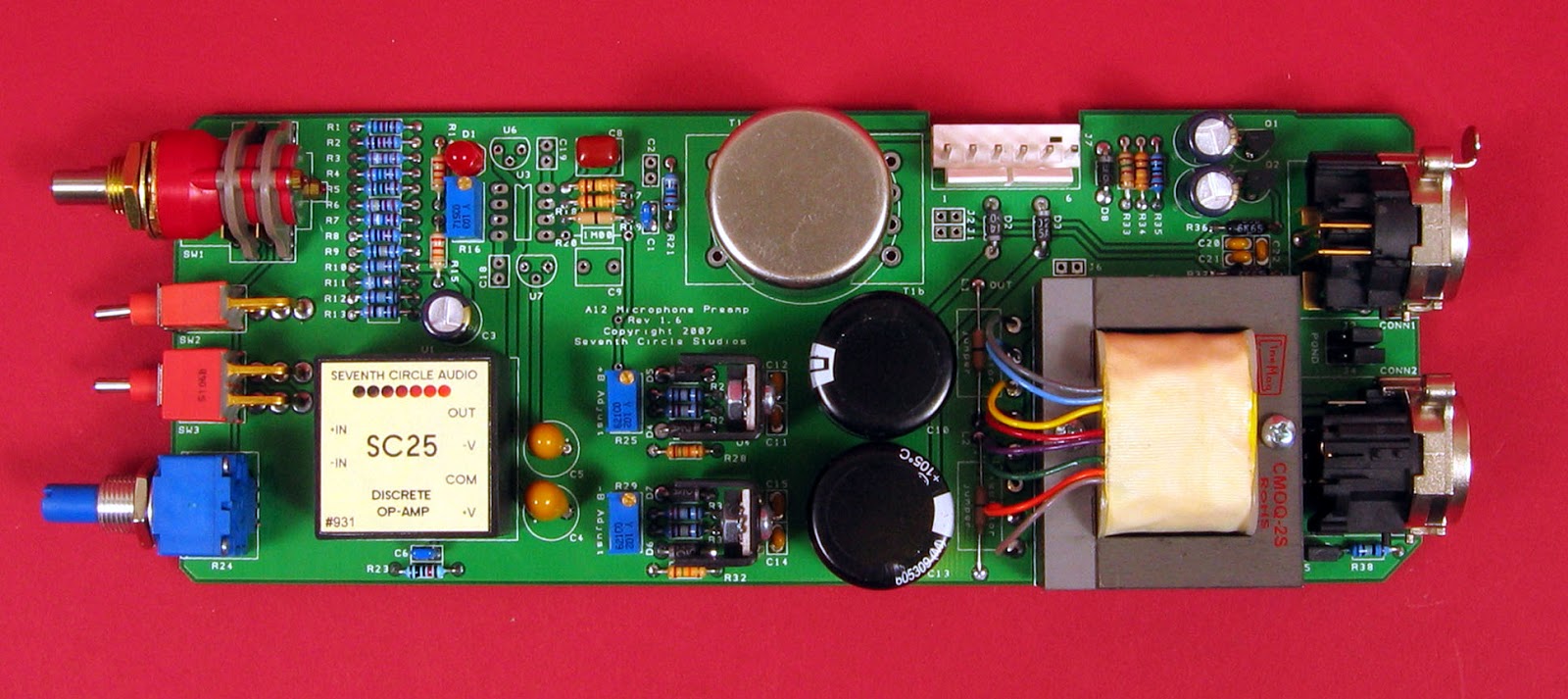
Seventh Circle Audio A12 mic pre (API clone build.)

Will be adding a A12 Preamp from Seventh Circle Audio to the audio arsenal at Coolidge Hill Studio soon.  It's an API clone preamp, based on API preamps.   Since they are on backorder, I'll be researching builds, and reading forums in the meantime.   The basic build will be completed at home and first power up testing at artisansasylum.com in Cambridge.


Thursday, May 23, 2013

Listening to Schoeps

I just spent quite a bit of time in the Schoeps listening room.   They have a beautiful interactive website that provides the opportunity to listen to a variety of microphone (capsule) placements on piano, ensemble in a hall, studio vocals and spoken word.  Each recording environment lists pre-amps, software and hardware.  There are four mic placements on the Grand Piano: A/B with MK2, MS with MK4/MK8, 2x BLM 03C,  2x CCM4.   Clicking on the mic icons while playing the track allows for great A/B comparison of mics and placements.

The ensemble has four stereo pairs at various angles and distances, and the singer has four mic options with a slider for dry vocals / instrumental mix.  The spoken word uses distance as the main criteria for evaluating four mics.

The Schoeps Showroom is a great place to hear the subtle differences in mic placements, stereo configurations, distances effects, etc.  While not as useful to Schoeps as a marketing tool, it would be interesting to have a demo of off-axis responses as well.

Enjoy!

Schoeps Showroom


Monday, April 8, 2013

Afro-Latin Drumming Documentary - Part One

Translated from Google:
As part of a series of educational videos and educational Afro Latin percussion. Tomb La Ta presents this audiovisual material called 'The touches of drum Afro - Montevidean'.
This edition was done by the national Musical documentation center
Lauro Ayestarán (CDM) of the Ministry of education and culture,
within the framework of the UNESCO project of participation 2011.
In this material show different expressions that make up the Candombe, its characteristics and differences, and the word of its references.

Just listen...


Sunday, April 7, 2013

The craftman had a five-year apprenticeship. 
It takes 21 days to make a Zildjian cymbal. 


Saturday, April 6, 2013

Makes it look so easy...


I see so very little power tools...

Smiley the Jazz Cat Building a Stave Drum

While there are many important factors to consider before taking on a project like this, keeping the bearing edges flat and making sure there are no gaps between the staves are critical.


Saturday, February 18, 2012

Drum Set Mic Shootout

A few years ago, Sound on Sound  published an comprehensive drum set mic shootout with audio files.    They are very non-committal on choosing a favorite mic and the audio samples are only one hit each so to make realistic comparisons, you'll need to load them into a DAW and loop them.  Having this many samples available is incredibly useful for selecting a new mic, and the photos priceless.
 
Kick Drum mics: 
In the middle is the Electrovoice RE20, above it is the Neumann U47 FET, and below it the AKG D12. To the right is Sennheiser's MD421, while a Shure SM57 and an AKG D112

Five classic snare mics were compared over the top of the drum for the 'SnareMics' audio files (left, clockwise from top left): a Neumann KM84, a Shure SM57, an AKG C451EB, a Neumann KM86 and an AKG C414B-ULS. Above, under the snare were a further SM57 and C451EB.


 Here you can see the recording setup for the 'KickHeadOffMid' audio files, demonstrating the sounds of different mics and mic positions inside the kick drum. The five AKG D112s were at equal distances from the batter head, but in different lateral positions. (This same multi-D112 rig was used for all the other 'KickHeadOn' and 'KickHeadOff' files as well.) Above them, at the same distance from the batter head, were (left to right) an AKG D12, a Sennheiser MD421, and an AKG C414B-ULS.


The recording of the 'KickHeadOnOutside' audio files placed five AKG D112s at four inches from the kick drum's resonant head, and combined them with a Sennheiser MD421 and a Neumann KM84 miking the batter-head side. You can also see the positions of the two externally positioned U47 FETs recorded alongside all the 'KickHeadOn' and 'KickHeadOff' files, which were there to demonstrate the potential of a number of common dual-miking techniques.